Mobile proxies explained: carrier-grade NAT, rotation, prices and when they are worth it
Mobile proxies send your traffic out through 4G and 5G carrier networks, where one public IP is shared by many phones. How carrier-grade NAT works, why sites hesitate to block carrier IPs, sticky sessions up to 120 minutes, mobile prices across seven providers, and when residential is enough.
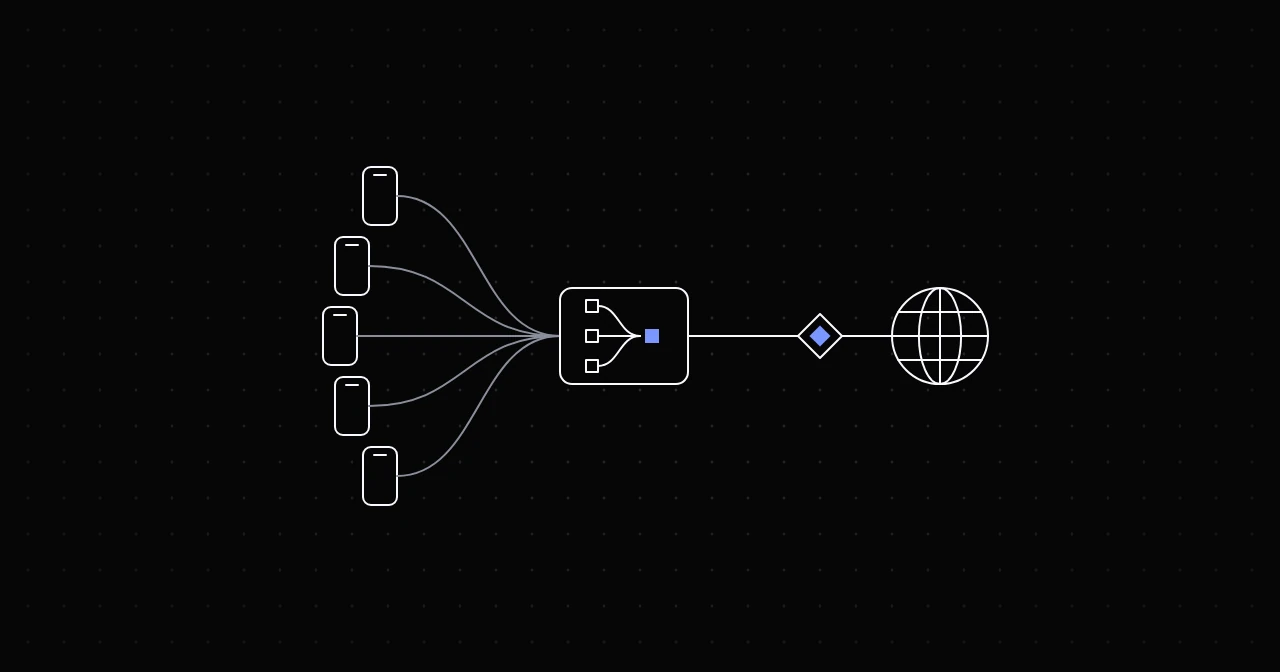
A mobile proxy forwards your requests through a device on a cellular network, so websites see an IP address that belongs to a carrier such as T-Mobile, Verizon or KDDI instead of a home broadband line or a server. That single detail changes how sites treat the traffic, because carriers put many subscribers behind each public IPv4 address. This guide covers how that sharing works, why it earns mobile IPs extra leeway, what rotation and sticky sessions mean on a carrier network, what mobile traffic costs, and when a cheaper proxy type does the job.
Where mobile IPs come from
Carriers have far more devices on their networks than public IPv4 addresses to give them. The standard answer is carrier-grade NAT (CGNAT): each phone gets a private address inside the carrier's network, and a NAT device translates many of those private addresses to one shared public address on the way out. The practice is common enough to have its own address block: RFC 6598, published in April 2012, reserved 100.64.0.0/10 as Shared Address Space for carrier-grade NAT.
Two things follow for anyone using a mobile proxy:
- One IP, many people. The public IP your request leaves from can, at the same moment, carry traffic from ordinary subscribers of the same carrier.
- IPs move. The public address behind a device is not fixed. It can change when the device reconnects, and the carrier can reassign it at any time.
Why websites go easy on mobile IPs
A website that blocks an IP address blocks everyone behind it. For a home connection that is one household. For a carrier's shared address it can be a large number of real customers on their phones, a cost most sites will not accept. So sites tend to give carrier ranges more room: they challenge them less readily, and they lean on other signals, such as cookies, account history and browser fingerprints, before they block.
That is the whole value of a mobile proxy, and it has limits. The trust attaches to the IP, not to you. A mobile IP does not hide a headless browser with a default user agent, an account that suddenly logs in from another country, or a request rate no human produces. The proxy mistakes guide lists the signals that give automation away whatever the IP.
How a mobile proxy network works
Behind a mobile proxy there are devices with SIM cards on a carrier's network, phones or cellular modems. The provider's gateway receives your request and sends it out through one of them, so the target sees the carrier's public address. You connect to the gateway with an ordinary HTTP or SOCKS5 proxy URL; nothing on your side is mobile-specific.
The practical consequences:
- Speed depends on the radio link. Signal and network load decide each exit's throughput and latency, so mobile exits are usually slower and less consistent than wired ones.
- Exits can drop. A device that loses signal or reconnects ends a session early, so build in retries.
- Traffic costs more. Providers pay for the devices and the cellular data, which shows in per-gigabyte prices.
Rotation and sticky sessions
Mobile proxies come in the same two modes as residential:
- Rotating: each new connection can go out through a different exit and IP.
- Sticky: a session ID keeps your connections on the same exit for a set time.
At NyxonProxies, a sticky mobile session holds one carrier IP for up to 120 minutes, the same limit as residential. You set it in the username: -session- with an ID of your choice, and -time- with the length in minutes.
curl -s -x "http://USERNAME-country-gb-session-k7m2q9xa-time-30:[email protected]:8080" https://ipinfo.io/jsonUse your mobile credentials from the Generate page, which builds these usernames for you. Two caveats apply on any carrier network:
- The carrier can still change the IP. A sticky session holds your exit, but the product page lists rotation as carrier-triggered or timed, so design for an IP change mid-session.
- Parallel connections differ. On a rotating username, each connection can get its own exit, so a multi-step flow belongs on a sticky session.
The sessions guide explains both modes in detail.
Targeting
The NyxonProxies mobile pool covers 110+ countries, with no exits in the United States. The Generate page targets it by country, and you can stay on one carrier by adding -asn- and the carrier's ASN, the number that identifies a network, to the username. The locations pages list the carrier ASNs in each country. If a job depends on one specific carrier, check that it is listed before you buy.
Mobile vs residential
- Trust on strict sites: mobile gets the most leeway, because each IP is shared with real subscribers. A residential IP looks like one household.
- Pool size: residential is larger. At NyxonProxies, 120M+ residential IPs in 160+ countries, against 110+ countries for mobile.
- Speed: residential exits are home connections; mobile exits depend on the radio link. Both are slower than datacenter.
- Sessions: sticky sessions last up to 120 minutes on both.
- Price at NyxonProxies: Residential Budget $0.35/GB, Residential $1.10/GB, Mobile $1.25/GB.
What mobile proxies cost
Mobile traffic is sold per gigabyte almost everywhere. The prices we found on 23 October 2026:
- NyxonProxies: $1.25/GB, one flat rate, pay as you go.
- DataImpulse: $2/GB, or $1.60/GB on the 1 TB pack.
- Evomi: $3.98/GB pay as you go, as low as $2.20/GB.
- Decodo: $4/GB pay as you go, and $3.75 down to $2.25/GB on monthly plans, at the discounted prices shown that day.
- Oxylabs: $7.50/GB on the smallest plans, down to $3.50/GB on Enterprise.
- IPRoyal: $6.80/GB for 2 GB, down to $5.20/GB for 100 GB, or dedicated mobile proxies from $10.11 per 24 hours.
- SOAX: the same rates as its residential traffic, set by plan and by country tier. For the United States, $5.00/GB without a plan, down to $1.50/GB on the $1,500 Scale plan and from $0.85/GB on Enterprise.
So a flat $1.25 is low for mobile, but not the lowest rate anywhere: SOAX's largest plans go lower in some countries. Our comparisons with DataImpulse, SOAX and Oxylabs go through the details.
When mobile proxies are worth it
- Platforms built around phones, such as social networks and mobile apps, where a carrier IP matches what the platform sees from its users.
- Mobile ad verification, checking which ads and redirects people on a given carrier and country are served.
- Testing your own app or site the way customers on a cellular network experience it.
- Targets that keep challenging residential IPs, once you have ruled out the client-side causes.
When they are not
- Bulk collection from sites that accept residential or datacenter IPs. You pay more per gigabyte for trust you do not need.
- Long-lived fixed identities, such as an account you use from the same address for weeks. A carrier IP changes; a static ISP IP does not.
- Bandwidth-heavy work, such as downloading media, where speed and price per gigabyte matter most.
Check what you got
Look at the exit through an IP information service:
curl -s -x http://USERNAME:[email protected]:8080 https://ipinfo.io/jsonThe org field shows the network's ASN and name. For a mobile exit, it should name a mobile carrier rather than a home broadband provider or a hosting company. Run it twice with a sticky username to confirm the session holds. The 60-second proxy test covers latency checks too.
FAQ
What is a mobile proxy? A proxy that sends your traffic out through a device on a 3G, 4G or 5G network, so sites see a carrier's IP address.
Are mobile proxies better than residential proxies? For trust on strict sites, usually, because carrier IPs are shared by many real users. For pool size, speed and price, residential usually wins.
Why do mobile IPs change? Carriers assign public addresses dynamically and share them through carrier-grade NAT, so the address can change when the device reconnects or when the carrier reassigns it.
Can other people use the same mobile IP? Yes. Under carrier-grade NAT, ordinary subscribers share the public address your requests leave from, which is exactly why sites hesitate to block it.
Are 5G proxies different from 4G proxies? The network generation changes the speed of the radio link, not how websites classify the address. Both are carrier IPs.
Try it
Mobile traffic at NyxonProxies costs $1.25/GB, and the smallest order is 1 GB. Create an account, top up in crypto, and copy your mobile credentials from the Generate page. Linking Discord under Freebies adds 250MB of free Residential Budget traffic, enough to compare a residential exit with a mobile one on your own target. The mobile proxies page lists the specifications, and the proxy types guide puts mobile next to the other three types.